ok i finally got the spells to work double shift should be just two bubbles shift, shift also don't use shift and space, they are way to hard to press when you have hands on wsad and mouse...
use "q" and "e"
also dialogue skip button should display full text, then skip if pressed again i skipped multiple dialoguies that were showing up too slowly and couldnt skip replayed ones like shrine and village before encounter scene..
we’re in a process of adjusting the spells plus giving the player a feedback that pressing keys during the sequence worked. for us shift and space makes the most sense because it was designed in a way that the player could cast the spell while moving (your pinky should be on the shift while thumb should be pressing space). we’re also about to fix the bug with the player turning to the different direction. the dialogue is also still about to be adjusted and we will think about changing the placement of the foreground elements. thank you for your feedback we will consider it in the future changes :>>
hi! sorry for your poor experience, for the spells to work you have to complete the qte sequence, the "something" that appears after you press 1, 2 or 3.
also, do you mind sharing your screen specs? as everything might be just a ui scaling issue, for which we are terribly sorry and will try to fix in the nearest time. =(
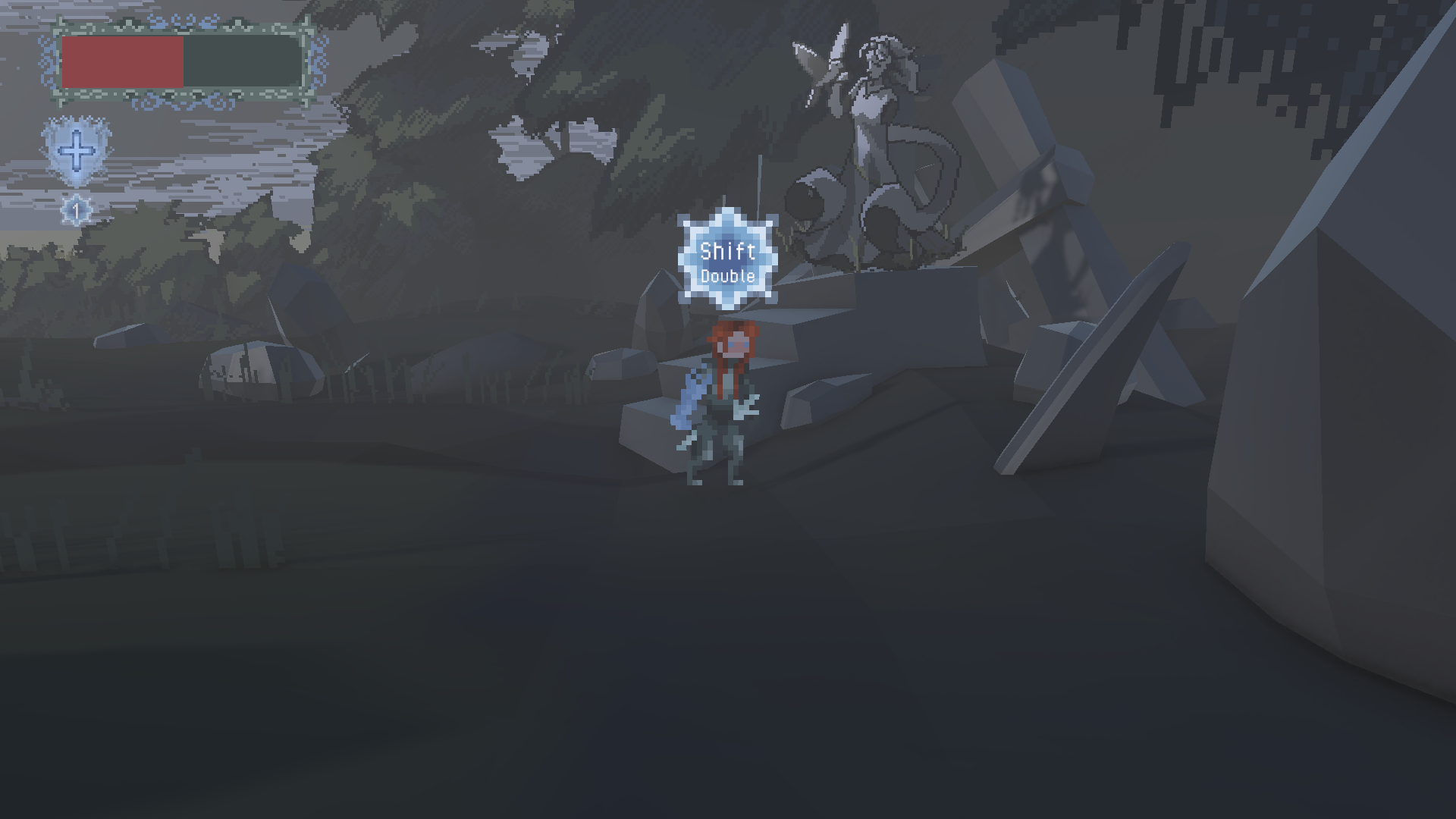
i pressed shift but it didnt do anything what is double? i think this QTE system needs more explanationi see this popup on the screen but i dont know what to press
game seems interesting so its frustrating i cant progress
hii! you just have to click the keys that appear in the blue circle above your character after activating a spell (through clicking 1,2 or 3. You shouldn’t rush the process because it might ruin the sequence (unless it says double, then you need to repeatedly press shift two times). this is why I would advise you to use spells before you attract a huge swarm of enemies because it will give you more freedom to get the sequence right. when I played I managed to lure them one by one even when they were grouped. Hope this helps! let us know if you have any more questions :> we as a team are also in a process of patching the game so thank you for the feedback
also i hight recomment patching - adding soem skip for first talk - moving quit on death screen to top left corner so you dont press it accidentaly when spamming attack during combat


← Return to game
Comments
Log in with itch.io to leave a comment.
ok i finally got the spells to work
double shift should be just two bubbles shift, shift
also don't use shift and space,
they are way to hard to press when you have hands on wsad and mouse...
use "q" and "e"
also dialogue skip button should display full text, then skip if pressed again
i skipped multiple dialoguies that were showing up too slowly
and couldnt skip replayed ones like shrine and village before encounter scene..
also fix hitting anim direction
it often swapped to left that was annoying as enemies appear on right
also background elements like trees fully cover character on some routes
we’re in a process of adjusting the spells plus giving the player a feedback that pressing keys during the sequence worked. for us shift and space makes the most sense because it was designed in a way that the player could cast the spell while moving (your pinky should be on the shift while thumb should be pressing space). we’re also about to fix the bug with the player turning to the different direction. the dialogue is also still about to be adjusted and we will think about changing the placement of the foreground elements. thank you for your feedback we will consider it in the future changes :>>
rage quit
skills dont do anything and i have really low hp, i want to heal, i press one, something appears but my hp is still low
shield same thing
no counterplay in fights, i just spam attack and get hit
when i die popup has quit to menu in the center and i go back to menuby mistake
and get unskippable cutscene again...
hi! sorry for your poor experience, for the spells to work you have to complete the qte sequence, the "something" that appears after you press 1, 2 or 3.
also, do you mind sharing your screen specs? as everything might be just a ui scaling issue, for which we are terribly sorry and will try to fix in the nearest time. =(
i pressed shift but it didnt do anything
what is double?
i think this QTE system needs more explanationi see this popup on the screen but i dont know what to press
game seems interesting so its frustrating i cant progress
hii! you just have to click the keys that appear in the blue circle above your character after activating a spell (through clicking 1,2 or 3. You shouldn’t rush the process because it might ruin the sequence (unless it says double, then you need to repeatedly press shift two times). this is why I would advise you to use spells before you attract a huge swarm of enemies because it will give you more freedom to get the sequence right. when I played I managed to lure them one by one even when they were grouped. Hope this helps! let us know if you have any more questions :> we as a team are also in a process of patching the game so thank you for the feedback
also i hight recomment patching
- adding soem skip for first talk
- moving quit on death screen to top left corner so you dont press it accidentaly when spamming attack during combat